Growth is supposed to be good news. But when your technology can’t match the pace, every new employee, office, or product line exposes cracks in the foundation. A resilient IT infrastructure turns that equation around. Instead of technology dragging behind the business, it becomes the platform that makes expansion possible, stable, and secure.
This guide breaks down what IT infrastructure for growing businesses actually looks like in 2026, from network design and cloud migration to cybersecurity, disaster recovery, and the budget planning that ties it all together.
Why Growing Businesses Need Strong IT Infrastructure
Small companies can get by with consumer-grade routers, a handful of laptops, and a shared Google Drive. That stops working somewhere around 20 employees. By the time you hit 50, the gaps are painfully obvious: slow file access, security blind spots, no centralized management, and zero visibility into what’s actually happening on your network.
Building a solid business IT infrastructure before you hit those growing pains is dramatically cheaper than rebuilding after a breach or outage forces your hand. According to Gartner, companies that invest in scalable IT infrastructure early spend 30% less on emergency fixes over a five-year period than those that bolt on solutions reactively. The businesses growing fastest in 2026 treat their IT infrastructure strategy as a growth enabler, not a cost to minimize.
Common IT Challenges During Business Growth
The pattern repeats across industries. A company outgrows its original setup, and suddenly everything feels held together with duct tape. The most common challenges include bandwidth bottlenecks as more users compete for the same internet connection, security gaps created by BYOD policies and ungoverned shadow IT, data scattered across personal drives with no backup strategy, onboarding delays because there’s no standardized provisioning process, and compliance exposure when regulated data lives on unmanaged devices.
These aren’t theoretical risks. They’re the daily reality for businesses that scaled their team without scaling their IT infrastructure for growing businesses to match.
What Is a Resilient IT Infrastructure?
Resilient IT infrastructure is a technology foundation designed to absorb disruptions and recover quickly without losing data, productivity, or security. Resilience means your systems don’t just work when everything is perfect. They work when a server fails, when a ransomware attack hits, when your internet provider goes down, or when you need to double capacity in 60 days.
A truly resilient setup combines four qualities: redundancy (no single points of failure), scalability (the ability to grow without rebuilding), security (protection built into the architecture, not bolted on afterward), and recoverability (tested disaster recovery that actually works under pressure).
Scalable Network Design for Expanding Teams
Network architecture is where scalable IT infrastructure starts. A network designed for 15 people won’t support 60 without rethinking the fundamentals: switching capacity, Wi-Fi density, VLAN segmentation, QoS policies, and internet bandwidth.
The goal is a network that can absorb new users, devices, and locations without a forklift upgrade every time you hire. That means enterprise-grade switching and wireless access points, network segmentation that isolates departments and IoT devices, redundant internet connections with automatic failover, and centralized management that gives your IT team visibility across every site. Growing companies that skip this step end up spending more on emergency network overhauls than they would have spent getting it right the first time.
Cloud Solutions for Flexibility and Growth
Cloud adoption isn’t optional for growing businesses anymore. It’s the fastest way to add capacity, enable remote collaboration, and avoid the capital expense of building out physical server rooms. But cloud migration without a clear IT infrastructure strategy leads to sprawl, overspending, and security gaps.
The right approach matches workloads to the right cloud model: SaaS for productivity tools, IaaS for compute-heavy applications, and hybrid configurations that keep sensitive data on-premises while leveraging cloud elasticity for everything else. Read more about scaling IT with your business and why flexibility in managed services matters as you grow.
Strengthening Cybersecurity from Day One
Cybersecurity can’t be an afterthought bolted onto an existing setup. For resilient IT infrastructure, security needs to be woven into every layer: endpoint protection, email filtering, firewall policies, identity management, and network monitoring.
The range of cyber threats facing businesses in 2026 includes AI-powered phishing, ransomware-as-a-service targeting SMBs, and supply chain attacks that exploit trusted vendor relationships. Businesses building their IT infrastructure for growing businesses need to assume they will be targeted and design their defenses accordingly.
Learn how CyberShieldIT uses AI to detect threats before they become breaches with continuous monitoring and automated response.
Data Backup and Disaster Recovery Planning
Every business IT infrastructure needs a disaster recovery plan that goes beyond “we back up to the cloud.” A real DR strategy answers specific questions: What’s your Recovery Time Objective? How fast can you restore operations? What’s your Recovery Point Objective? How much data can you afford to lose? Have you tested recovery in the last 90 days?
The 3-2-1 backup rule still holds: three copies of your data, on two different media types, with one copy stored offsite. But in 2026, you also need immutable backups that ransomware can’t encrypt, automated backup verification, and documented runbooks that your team can execute under pressure.
Reducing Downtime with Proactive Monitoring
Downtime costs mid-sized businesses an average of $5,600 per minute, and more recent estimates push that number significantly higher. Proactive monitoring catches failing hardware, full disk drives, memory leaks, and certificate expirations before they trigger an outage.
Discover why AI-driven managed IT services reduce downtime by using predictive analytics and automated remediation to resolve issues before users ever notice them. Organizations with proactive monitoring achieve up to 99.9% uptime, a number reactive models simply can’t match.
Supporting Remote and Hybrid Workforces
Remote and hybrid work is a permanent fixture for most growing companies. Your scalable IT infrastructure needs to account for it from day one, not treat it as a temporary exception. That means zero-trust network access instead of traditional VPN, cloud-based identity management, endpoint detection and response on every company device, and secure collaboration tools that don’t require employees to use personal accounts or unsanctioned applications.
The companies getting this right centralize management through a single platform that gives IT teams the same visibility into a remote laptop in Austin as an office workstation in Tampa.
Secure Access Control and User Management
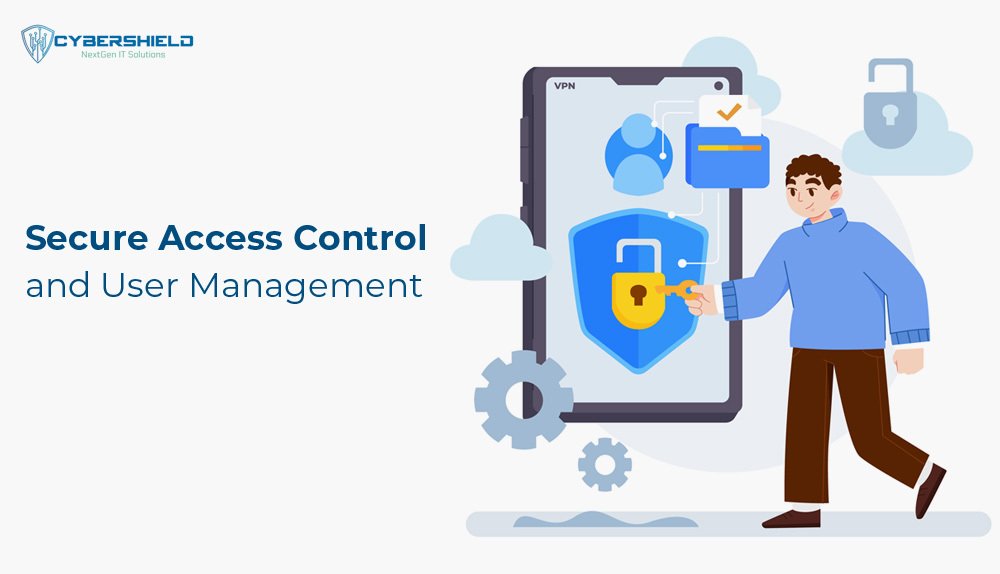
As your team grows, so does the number of people with access to sensitive systems and data. Without proper access control, every new hire is a potential security risk. Role-based access control, multi-factor authentication, automated provisioning and de-provisioning, and regular access reviews should be standard components of any business IT infrastructure.
The principle of least privilege matters here: every user gets the minimum access they need to do their job, nothing more. When someone changes roles or leaves the company, their access gets updated or revoked immediately, not weeks later when someone remembers to submit a ticket.
Upgrading Hardware and Software at the Right Time
Running equipment past its useful life creates a false economy. The money you save by delaying a server replacement gets wiped out by the first extended outage it causes. A sound IT infrastructure strategy includes a hardware lifecycle plan with predictable replacement schedules, typically every four to five years for servers and three to four years for workstations.
Software follows a similar logic. End-of-life operating systems and applications stop receiving security patches, creating vulnerabilities that attackers actively target. Windows 10 end-of-support in October 2025 is a recent example that caught thousands of businesses off guard.
IT Budget Planning for Long-Term Stability
Resilient IT infrastructure requires predictable investment, not sporadic emergency spending. Best practice is allocating 4-6% of revenue toward IT for small and mid-sized businesses, though that percentage varies by industry and regulatory requirements.
The budget should split between operational expenses (managed services, cloud subscriptions, software licenses) and capital investments (hardware refreshes, infrastructure upgrades, new security tools). Companies that plan their IT spending in 12-month cycles with quarterly reviews avoid the budget shocks that come from unplanned failures and emergency projects.
Compliance and Data Protection Requirements
Growth often brings new compliance obligations. A company that expands into healthcare needs HIPAA compliance. Financial services require SOX controls. Any business handling European customer data needs GDPR readiness. Even businesses outside regulated industries face increasing pressure from cyber insurance carriers who require specific security controls as a condition of coverage.
Your scalable IT infrastructure should make compliance achievable, not painful. Centralized logging, encryption at rest and in transit, documented access controls, and regular vulnerability assessments form the foundation. Building these capabilities into your architecture from the start is far cheaper than retrofitting them after an audit finding or insurance denial.
Using Automation to Improve Efficiency
Automation transforms IT from a bottleneck into a force multiplier. CyberShieldIT’s AI-driven IT Shield solutions use automated patch management, self-healing scripts, and intelligent alerting to handle routine maintenance without human intervention. That frees your IT team to focus on strategic projects instead of firefighting.
Common automation targets for growing businesses include automated employee onboarding and offboarding (provisioning accounts, devices, and access in minutes instead of days), scheduled patch deployment across all endpoints, automated backup verification and reporting, and security incident response playbooks that contain threats within seconds. The result is a business IT infrastructure that runs more reliably with less manual effort.
Partnering with a Managed IT Service Provider
Most growing businesses reach a point where managing IT in-house becomes unsustainable. You need senior-level expertise for architecture decisions, 24/7 monitoring coverage, and a bench deep enough to handle multiple issues simultaneously. Building that team internally costs $300,000 or more per year for even a modest IT department.
A managed IT service provider gives you that entire capability on a predictable monthly fee. The right partner brings enterprise-grade tools, certified engineers, and proven processes that would take years to build internally. CompTIA data shows that 46% of businesses using managed IT services reduced their overall IT costs by 25% or more while improving security and uptime.
Future-Proofing Your IT Systems
Technology changes fast. The infrastructure decisions you make today need to account for where your business will be in three to five years. Future-proofing IT means choosing platforms and architectures that adapt, not solutions that lock you in.
That means favoring open standards over proprietary lock-in, building modular systems that can be upgraded component by component, investing in staff training so your team can manage evolving technologies, and maintaining a technology roadmap that aligns IT investments with your business growth plan. A resilient IT infrastructure isn’t a one-time project. It’s an ongoing discipline that evolves as your company does.
Build Your Resilient IT Infrastructure with CyberShieldIT
CyberShieldIT helps growing businesses build IT infrastructure that scales with them, not against them. Our ITShield service delivers 24/7 monitoring, automated alerting, patch management, and helpdesk support on a predictable monthly fee. CyberShield adds layered threat detection with our MSSP Security Operations Center protecting your environment around the clock. Cloud Shield secures your cloud infrastructure, and Comm Shield locks down your communications.
Stop outgrowing your IT. Start building infrastructure that grows with you.